
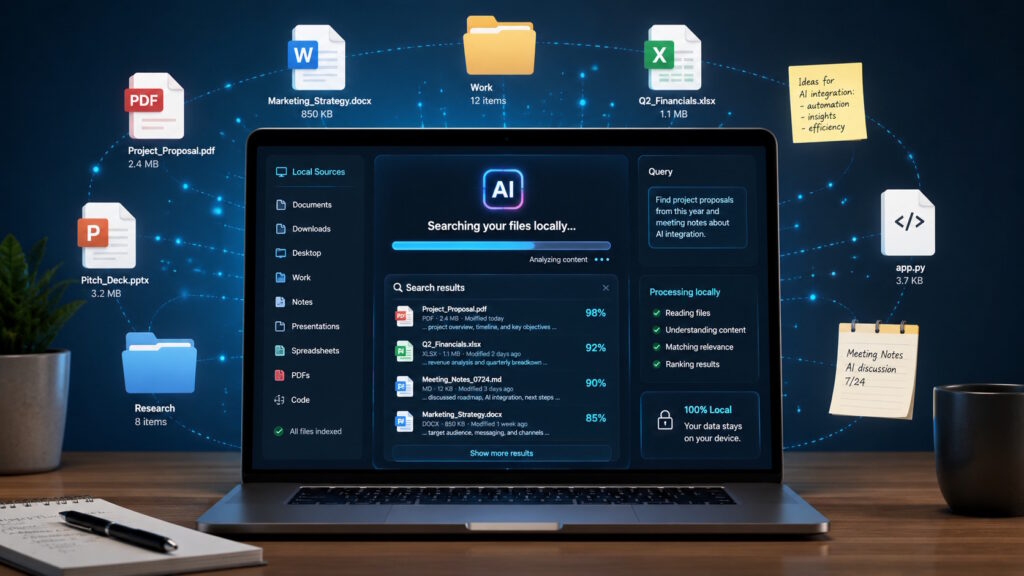
Quick Answer: Yes, a fully local on-device RAG system can search files without uploading them to a cloud service. It uses semantic retrieval to find relevant passages and provides them to an AI model for an answer. However, privacy depends on the application, since some systems may still send selected content to a cloud-based model.
On-device RAG lets AI search your files without automatically sending them to a cloud service. In a local RAG setup, retrieval and generation can happen near documents stored on your computer or phone. You could ask about an old report, a product manual, or scattered meeting notes using everyday language.
Can AI help with your files while those files remain on your device? In a fully local setup, yes. However, the application’s design determines which steps stay local and which steps connect to the cloud.
The idea feels increasingly relevant as devices gain stronger processors and smaller AI models. Developers can now combine local search, document retrieval, and language generation within one application. This combination could make private and workplace information easier to explore without defaulting to a cloud workflow.
What Is On-Device RAG?
RAG means retrieval-augmented generation. It gives an AI model useful information before the model answers a question. Instead of relying only on prior training, the system searches a selected knowledge source. It then adds relevant passages to the model’s prompt.
In a typical cloud setup, an application may upload documents, create an index, and run the model on remote servers. On-device RAG moves some or all of those steps onto local hardware. The device may process documents, create embeddings, retrieve passages, and generate answers.
This process does not train a new model on every file. The application retrieves information related to the current question. Microsoft describes local RAG as embedding-based search paired with a chat model grounded in the user’s documents.
How Can AI Search Your Files Without Uploading Them?
In a fully local workflow, the files can remain on the device. The application first prepares their content for search.
It may divide a report into smaller passages. Then it creates embeddings, which represent aspects of meaning as numbers. When you ask a question, the system creates another embedding for that query. It compares the query with stored passages and identifies the closest matches.
The model receives those matches as context. It can then produce an answer based on the retrieved material. The process resembles finding the right pages before asking someone to explain them.
The model does not need every document in the conversation. It only needs the passages most relevant to your question. This selective approach can make local document search more practical.
Search by Meaning, Not Just Filenames
Traditional file search often depends on exact words, filenames, or folder locations. That works when you remember what the document says. It becomes frustrating when you remember only the idea.
Imagine looking for a maintenance report about repeated overheating. The report may use phrases such as “thermal events” or “temperature excursions.” You remember the problem, but not the wording. A basic keyword search could miss the file.
Semantic search takes a different approach. It looks for related meaning instead of demanding an exact verbal match. That allows an application to connect a natural question with relevant passages across several documents.
You could ask, “Which reports mention recurring equipment problems?” You would not need to remember the original terminology. The system could retrieve useful passages and build one grounded response.
Why Local Processing Changes the Privacy Conversation
The privacy appeal is easy to understand. A contract, product plan, customer record, or personal document may contain sensitive details. Local processing can reduce the amount of information sent to external servers.
Local operation may also support offline access. A user could search documents during travel, inside a restricted environment, or with unreliable connectivity. It may also reduce repeated cloud requests for routine tasks.
Google says on-device generative AI can keep sensitive data on the device and support offline use. Microsoft highlights similar benefits for Foundry Local, including privacy, offline operation, and lower latency.
Local Does Not Always Mean Fully Private
The label “on-device” deserves a closer look. An application could create embeddings locally but send retrieved passages to a cloud model. The original files would stay local, yet selected content would still leave the device.
A fully local workflow keeps retrieval and generation on the same device. A hybrid workflow divides those steps between local and cloud systems. Both approaches can be useful, but they create different privacy boundaries.
The architecture matters more than the label. Users should understand what an application sends, stores, or logs before sharing sensitive information.
Everyday Uses Are Easier to Picture
The most convincing examples start with information people already have. A technician could ask questions across equipment manuals and service records. A researcher could explore many papers without opening each PDF. An employee could search meeting notes, policies, and project documents through one conversational interface.
Personal uses also make sense. Someone could search recipes, journals, tax records, or saved articles with natural questions. The value comes from finding relevant information without remembering exact filenames.
Applications could also use local data quietly in the background. A writing assistant might find related notes while someone drafts. A support application might retrieve instructions for a specific product. A travel application might summarize saved plans without requiring a network connection.
These examples depend on the software, hardware, and permissions involved. Still, they show why the concept reaches beyond a technical demonstration.
Why On-Device RAG Is Becoming More Practical
Local AI has improved on several fronts. Smaller models can handle more useful tasks, while newer devices offer stronger AI processing. Software frameworks now help developers connect those models with retrieval systems.
Microsoft has published a Foundry Local tutorial for a RAG application that answers document questions entirely on a device. Google also offers an AI Edge RAG SDK for Android that can run completely on-device. These developments bring fully local retrieval closer to practical application development.
This shift expands the idea of edge AI. The device does more than run a model. It can organize knowledge, find relevant context, and generate a response within one local workflow.
However, practical does not mean universal. Performance still depends on the model, document collection, available memory, battery life, and hardware. Some devices will handle these workloads better than others.
Local and Cloud RAG Can Coexist
On-device systems will not replace every cloud system. Cloud platforms can provide larger models, more computing power, and easier scaling across large collections. They may suit complex questions or shared enterprise knowledge bases.
Local systems offer a different balance. They can support privacy, offline access, and quick responses for smaller or personal collections. Hybrid designs can keep sensitive steps local while using cloud resources for demanding tasks.
The better choice depends on the situation. A field worker may value offline access. A global company may need centralized governance and broad search. A personal assistant may prioritize local control over maximum model size.
This is not a contest between local and cloud AI. It represents a growing set of architectural choices. Users and organizations can decide where data should live and where each step should run.
Conclusion
AI can increasingly work with local files without treating cloud upload as the automatic first step. Retrieval gives the model selected context, while local processing keeps more of the workflow near the user.
The broader change reaches beyond document search. AI applications are starting to combine local knowledge, semantic search, and generation inside everyday devices. That could reshape how people use private information at work and at home.
The experience will still depend on careful application design and clear privacy boundaries. Want to keep exploring how AI is changing the world around us? Join the conversation at Tech Scope Connect for insights into the technologies shaping what comes next.
Sources:
- Gemini Nano | developer.android.com
- What is Foundry Local? | learn.microsoft.com
- Tutorial: Build a RAG Application | learn.microsoft.com
- AI Edge RAG Guide | developers.google.com