
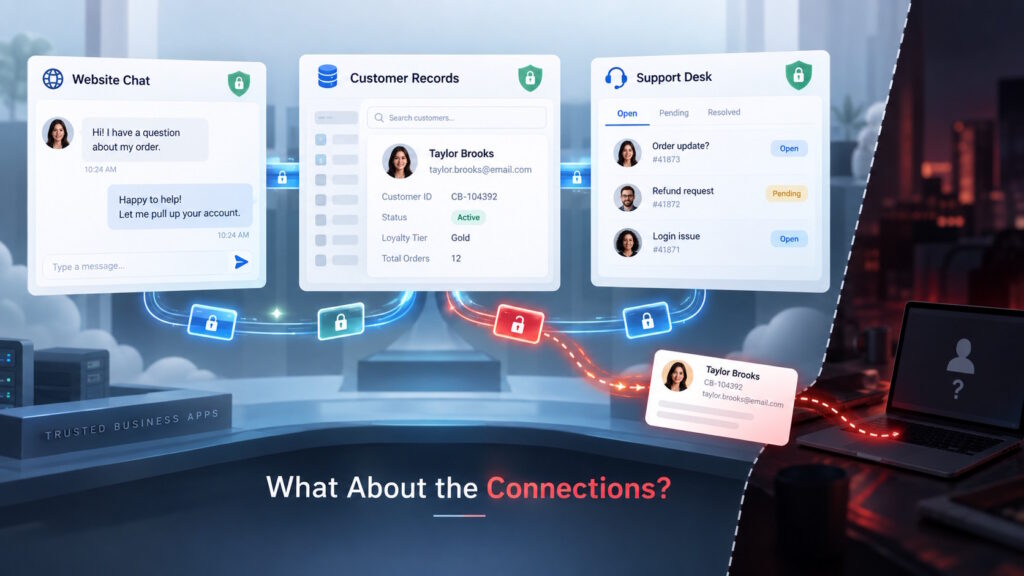
Quick Answer: Secure business apps do not automatically guarantee secure connections. Integration security depends on protecting credentials and controlling what connected applications can read or change. Each connection should have a clear purpose, appropriate permissions, and an owner who reviews its access. Your team should also know how to revoke that access during a security incident.
The Convenience Comes With a Question
Integration security deserves attention whenever your business apps share customer details or carry out tasks for one another. Securing those app-to-app connections belongs in your cybersecurity planning, alongside protecting each application.
Imagine a visitor asking a question through your website’s chat window. The chatbot creates a record in your customer relationship management (CRM) system, and a salesperson receives a notification. Nobody copies the conversation into a spreadsheet, and your team can respond with context.
The convenience is obvious, but the permissions behind that smooth handoff deserve a closer look. Could the chatbot read other customer records, or only create a new inquiry?
What Does Integration Security Actually Protect?
Integration security protects the connections through which applications exchange data and perform tasks together. That includes controlling access and protecting the credentials that make those interactions possible.
An integration lets separate applications work together rather than making people move information manually. In our example, it links the website chatbot with the CRM.
A connection may rely on an access token, a digital credential that lets software access permitted resources. Think of it as an access pass, rather than a password someone types into a login screen. Permissions help define which information and actions the application can reach.
You don’t need to understand the technical setup to ask a useful business question: “What have we authorized this connection to do?”
Does Your Chatbot Need the Whole Customer History?
The answer depends on its job. Creating a new inquiry, reading existing records, and changing customer information represent different kinds of access. Microsoft’s guidance distinguishes permissions that applications never use from permissions that more limited alternatives could replace.
Suppose your chatbot only collects names, email addresses, and questions from new visitors. You would have good reason to ask why its connection needs access to older support conversations.
However, a chatbot that helps returning customers might legitimately need some account history. The right decision starts with the workflow, not an assumption that every permission creates an unnecessary risk.
The same reasoning applies to a reporting tool. A dashboard showing monthly sales totals may have little reason to edit customer records.
For integration security, the gap to investigate sits between what an application needs and what it can actually reach. Unnecessary permissions can give attackers opportunities beyond the application’s intended function.
When a Trusted Connection Became the Way In
Cloudflare’s September 2, 2025, account of the Salesloft Drift breach shows how this risk can unfold. Attackers obtained credentials associated with the Drift chatbot’s Salesforce integration and used them to access Cloudflare’s Salesforce environment.
They took support-case text and related customer information, but not case attachments. Cloudflare reported that the incident did not compromise its own services or infrastructure. An existing integration provided access to customer information without attackers compromising Cloudflare’s core infrastructure.
The broader pattern also appears in Google Cloud’s introduction to M-Trends 2026, which draws on Mandiant’s 2025 investigations. It describes attackers stealing credentials from compromised software-as-a-service providers, then using those credentials to enter customer environments.
This does not mean one compromised app automatically exposes every system you use. The affected permissions and other security controls help determine what an attacker can reach.
For your business, the useful question is narrower: “What could someone reach through this particular connection?”
Yesterday’s Workflow May Still Have Today’s Access
Consider a marketing team that replaces a reporting tool after a campaign ends. The new dashboard works, everyone moves on, and nobody checks whether the old service still has access.
Or imagine that an employee changes roles after setting up a support integration. The connection still serves a purpose, but nobody takes over responsibility for reviewing it.
These are hypothetical situations, not evidence that your business has a problem. They show why a working connection deserves attention even when nobody complains.
Microsoft recommends regular reviews of previously granted application privileges. Its guidance also describes how permissions can accumulate while applications use only part of their available access.
Integration security therefore belongs in conversations about changing tools and workflows, not just conversations about buying software.
“Do we still use this?” makes a good starting question. “Does it still need the same access?” takes the review further.
How Can Your Team Take a Closer Look?
You don’t need to begin with a company-wide technical audit. A focused conversation about one important workflow offers a manageable starting point for business teams and IT.
Start With One System People Rely On
Your CRM might be a sensible place to begin. Together, its business owner and technical administrator can identify connected services and explain the purpose of each connection.
A simple record could note the service, its job, its access, and the team that relies on it. The goal is shared understanding, rather than a spreadsheet nobody opens again.
Give each connection access that fits its job
Microsoft recommends least privilege: access only to the information and operations an application needs for its work.
For a business team, that translates into a practical discussion about requirements. Does the reporting tool need to change records, or would viewing them support the same task?
Your technical team or provider can clarify which restrictions the product supports. Any proposed reduction should account for the workflow you still need.
Give integration security an ongoing owner
A useful arrangement pairs a business owner with a technical contact. One explains why the connection exists; the other handles its technical settings.
Reviews could coincide with a tool replacement, a major workflow change, or a transfer of responsibility. Those moments give your team a reason to revisit earlier decisions.
For an apparently unused connection, the owner can confirm whether another team still depends on it before anyone removes access.
Know who can disconnect a service
During its response, Cloudflare disabled the compromised Drift integration and disconnected third-party Salesforce integrations while it investigated.
Your preparation can start with knowing who has the authority and technical ability to revoke a connection’s access. It should also identify which customer-facing activities would stop and who would coordinate the response.
This is not a reason to disconnect useful tools indiscriminately. It is a reason to discuss the decision before an incident forces it.
Conclusion: The Connection Deserves Attention, Too
Your team can value automation while asking better questions about the access behind it. That approach brings cybersecurity into everyday business decisions without requiring everyone to become a security specialist.
When you next review a business app, the conversation can go beyond whether you trust the provider. What does its connection allow, and does that access still fit the job?
Curious about cybersecurity and emerging technology? Join the conversation at Tech Scope Connect to explore industry trends and share perspectives on what’s ahead.
Sources:
- Increase Application Security With the Principle of Least Privilege | learn.microsoft.com
- Access Tokens in the Microsoft Identity Platform | learn.microsoft.com
- The Impact of the Salesloft Drift Breach on Cloudflare and Our Customers | blog.cloudflare.com
- M-Trends 2026: Data, Insights, and Strategies From the Frontlines | cloud.google.com
- Reduce Overprivileged Permissions and Apps | learn.microsoft.com