Key Takeaway: An AI data center is much more than a collection of powerful servers. It is a carefully designed environment where computing, power, networking, cooling, and monitoring work together to support modern AI workloads. As AI systems become more demanding, efficient cooling has become just as important as computing power for maintaining performance, reliability, energy efficiency, and long-term scalability.
The AI Data Center Has a Heat Story
An AI data center is more than a room filled with powerful chips. It is the physical home of modern AI infrastructure, a high-performance computing facility built for constant machine-learning work. From the outside, it may look like another secure building with backup power and fiber connections. Inside, servers, networking, electricity, cooling, and monitoring operate like one carefully balanced system.
We often talk about AI as software. We discuss models, prompts, agents, automation, and data. Yet every AI tool also depends on buildings and equipment. The larger the workload, the more stress lands on the physical systems behind it. The International Energy Agency says AI is accelerating high-performance servers and increasing power density in data centers. It also projects global data center electricity use to more than double by 2030.
So, what happens inside one of these facilities? A walkthrough makes the cooling challenge easier to understand.
The Compute Floor: Where the Work Begins
Inside the facility, the computing starts with servers. In a traditional data center, servers may host websites, business apps, databases, or cloud services. In an AI facility, many servers use GPUs and other accelerators built for heavy parallel work.
A GPU can process many calculations at the same time. That makes it useful for model training and AI inference. Training builds or updates a model. Inference runs the model when someone asks a question or requests an output. Both activities use energy, and much of that energy becomes heat.
You may wonder, “Why do AI servers get so hot?” The basic answer is simple. They pack powerful chips close together and run them for long periods. Memory, storage, and networking equipment also support the workload. Together, they create a much hotter environment than many older server rooms.
GPU Racks: Small Footprint, Big Heat
Servers rarely sit alone. Data centers group them into racks, which look like tall cabinets. A rack can hold many servers, switches, power equipment, and cables. In AI environments, those racks can become very dense.
Density sounds efficient, and it often is. More computing power can fit into a smaller footprint. Teams can connect GPUs tightly, move data faster, and support larger workloads. The trade-off sits right in the air around the hardware. More computing in one place creates more heat in one place.
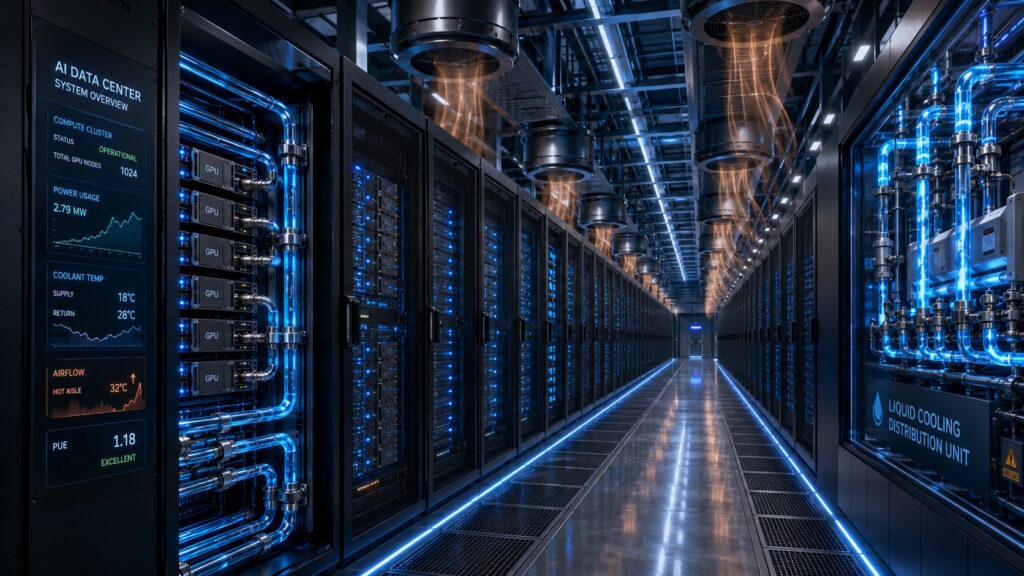
This is where cooling moves from background function to core design issue. Fans help, but air has limits. Air must move through tight server spaces, absorb heat, and carry it away. When racks get hotter and denser, moving enough air becomes harder.
Power and Networking: The Hidden Support System
The server racks get the attention, but they cannot work alone. High-speed networking connects GPUs so they can act like one large system. Power equipment delivers electricity safely and reliably. Backup systems help keep the facility running when problems happen.
This support layer also adds heat. Switches, power conversion equipment, storage systems, and cables all contribute to the thermal load. Nearly every watt that enters IT equipment eventually becomes heat.
So, is cooling part of computing? In practice, yes. The chips may perform the calculations, but cooling helps decide how hard those chips can run. When hardware gets too warm, systems may slow down to protect themselves. In worse cases, heat can shorten equipment life or cause failures.
Cooling Systems in an AI Data Center: The Quiet Backbone
Older data centers relied heavily on air cooling. They used cold aisles, hot aisles, raised floors, and powerful fans. Many facilities still use versions of these methods. They can work well for moderate loads.
AI changes the picture. Many newer designs use liquid cooling because liquid can carry heat more efficiently than air. Direct-to-chip cooling sends coolant to cold plates near hot components. The liquid picks up heat, then moves it to a heat exchanger. Immersion cooling takes a different path by placing equipment in a special nonconductive fluid.
Air cooling will not disappear overnight. Many sites use hybrid approaches. Air may still cool some equipment, while liquid handles the hottest components. ASHRAE highlights cooling technologies and energy efficiency as central data center design concerns. It also points to guidance focused on energy-efficient AI facilities.
Some new AI infrastructure designs show how far this shift can go. NVIDIA has described newer systems that cool chips and networking components through closed-loop liquid systems. The goal is not only lower temperature. Better cooling can also improve energy and water efficiency in large facilities.
Monitoring: The Facility That Watches Itself
A modern facility does not simply turn on the cooling and hope for the best. Operators track thousands of signals across the building. Sensors monitor temperature, humidity, pressure, airflow, power use, pump speeds, and coolant behavior.
This feedback helps teams adjust conditions before problems grow. It also helps them avoid overcooling. Too little cooling creates risk. Too much cooling wastes energy. The best result sits in the middle: hardware stays safe, while the facility avoids needless power use.
AI can help here too. Google DeepMind reported that machine learning reduced cooling energy use in Google data centers by up to 40%. The system used data from thousands of sensors, then predicted future temperature and pressure conditions.
That example shows a useful loop. AI creates more demand for computing infrastructure. Machine learning can then help operate that infrastructure more efficiently.
Why Cooling Now Shapes the Future of AI
Cooling used to sound like a facility detail. Now it influences where companies build, how they design racks, and how fast they scale.
A business leader may ask, “Why should I care about cooling if I do not run a data center?” The answer reaches beyond the building. Cooling affects cost, reliability, sustainability, and service availability. If infrastructure becomes harder to cool, AI services may become more expensive to deliver. If operators cool better, they can support more computing with fewer wasted resources.
The Department of Energy has pointed to advanced cooling and water-reuse work as part of broader data center innovation. That focus reflects a larger shift. Cooling now sits inside conversations about grid demand, water use, facility design, and responsible AI growth.
Conclusion: The Cool Side of Intelligence
An AI data center is not just a warehouse for servers. It is a coordinated environment where computing, power, networking, cooling, and monitoring depend on one another. The GPUs may get the spotlight, but the cooling system helps make their work possible.
As AI adoption grows, the hidden infrastructure behind it will matter more. Faster chips will still be important. Smarter software will still shape the market. Yet the next stage of AI will also depend on how well the industry manages heat.
When someone asks, “What powers AI?” the full answer includes electricity, silicon, data, software, and cooling. The cooling piece may not feel glamorous, but it keeps the whole system in motion. If you’re interested in how AI infrastructure and other emerging technologies are evolving, join the conversation at Tech Scope Connect. Our live newscasts, expert discussions, and global summits explore the innovations shaping the future of technology.
Sources:
- Energy Demand From AI – Energy and AI – Analysis | iea.org
- Executive Summary – Energy and AI – Analysis | iea.org
- ASHRAE Data Center Resources — Data Centers | ashrae.org
- Hotter Than a Hot Tub: The 45°C Breakthrough to Cool AI’s Biggest Machines | blogs.nvidia.com
- DeepMind AI Reduces Google Data Centre Cooling Bill by 40% | deepmind.google