Key Takeaway: Bluetooth broadcast audio lets one source transmit sound to many compatible devices within range without pairing with each listener. In equipped public spaces, you could hear presentations, interpretation feeds, or television audio through your own earbuds or hearing aids. Venues must provide the broadcast, and your listening setup needs explicit support—ordinary Bluetooth compatibility alone is not enough.
Bluetooth broadcast audio offers a way to hear public audio through your own compatible earbuds. This form of wireless audio broadcasting brings shared sound directly to personal devices in appropriately equipped spaces.
Imagine sitting near the back of a conference room while nearby conversations compete with the presenter. You hear the loudspeakers, but you keep missing parts of the explanation. What about listening through your earbuds instead, without asking the venue to pair with every attendee?
How Does Bluetooth Broadcast Audio Work?
Normally, you pair your earbuds with your phone to establish a personal audio connection. Broadcasting follows a different approach: a transmitter sends audio that many compatible devices within range can receive. It resembles tuning into a radio station, rather than arranging a separate connection for everyone listening. The transmitter doesn’t add an individual audio connection whenever someone joins.
Bluetooth LE Audio, which operates on Bluetooth Low Energy, adds this broadcasting capability. The important change is that one transmission can serve many listeners.
You may also encounter the name Auracast when reading about public listening services. The Bluetooth Special Interest Group (SIG) owns this trademark for defined configurations of Bluetooth broadcast audio. It describes a standardized capability, not one manufacturer’s earbuds or transmitter.
Tuning In Without Pairing With the Room
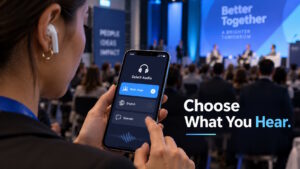
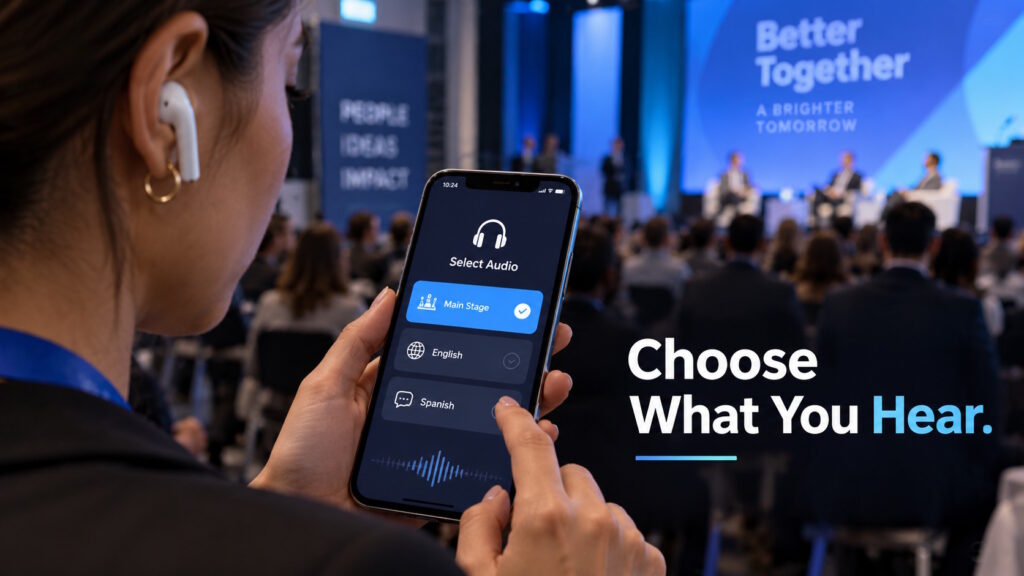
In an Auracast-supported setup, a compatible smartphone can help you discover broadcasts and choose what to hear. Think of a menu resembling available Wi-Fi networks, although the audio itself travels over Bluetooth. A conference menu might show “Main Stage” and “Interpretation,” letting you choose the broadcast that interests you.
After you choose a broadcast, the phone supplies your listening device with the information it needs to receive it. Your earbuds then receive the transmission directly, rather than relying on the phone to relay the audio.
The exact steps depend on your phone, listening device, and software. You might find the controls in system settings or a companion app; there isn’t one universal menu.
One Room, Several Ways to Listen
At a conference, Bluetooth broadcast audio could deliver the microphone feed to compatible earbuds, headphones, or hearing aids. This gives attendees another route to the presentation, including an assistive-listening option for people with hearing loss. It needn’t be an experience reserved only for that audience.
A multilingual event could offer the original presentation alongside an interpretation feed. GN Hearing Japan described that arrangement in a June 9, 2026, Bluetooth SIG interview about its office installation. Its system offered presentation and interpretation audio as separate listening choices.
An appropriately equipped theater could also provide an audio-description track, giving listeners spoken descriptions of visual elements. Broadcasting delivers that audio; it does not create the description or translate the performance. Organizers still need to supply those services.
At an equipped gym, you could hear a silent television without adding sound to the room. These examples depend on the location providing the relevant audio, rather than simply owning a Bluetooth-enabled television.
What Makes the Experience Work?
For the attendee, tuning in should feel straightforward. Behind that experience, the venue and the listening device each have a job.
The venue has a part to play
A venue needs a suitable audio feed, compatible transmission equipment, and coverage where visitors will listen. Microphone placement still matters: sending a poorly captured voice directly to earbuds does not repair the original audio. In the GN Hearing Japan interview, the installer emphasized supplying the system with high-quality microphone audio. For example, an audience question that never reaches a microphone won’t reach listeners through that microphone feed.
Visitors also need to know the broadcast exists and how to find it. Bluetooth SIG’s venue guidance recommends clear signage and staff preparation, including hands-on experience with receiving devices. Recognizable broadcast names also help. An attendee shouldn’t have to guess whether “Audio 1” means the keynote, an interpretation feed, or a nearby television.
Can your earbuds receive Bluetooth broadcast audio?
“Will the earbuds I already own work?” Not necessarily: ordinary Bluetooth support does not guarantee the required broadcasting features. A Bluetooth version number alone won’t settle the question either.
For an Auracast service, the useful checks are explicit receiving support and a supported way to select broadcasts. Manufacturer documentation should explain both, alongside any required software updates. Some existing products may gain support through upgrades, but hardware capabilities and manufacturer decisions determine what’s possible.
What the Technology Doesn’t Promise
Public audio doesn’t necessarily mean unrestricted access. Bluetooth broadcasts can remain open or require a passkey, so some events may limit who can listen.
Nor does an installation automatically prove better listening for everyone. A Bluetooth SIG profile of Isaac Theatre Royal described an installed system supporting assistive listening and additional audio services. However, the profile stated that the theater had not yet collected patron feedback when it was published. An installed feature and a measured audience benefit are different things.
Conclusion: A Shared Event, a More Personal Way to Listen
Back in that conference room, the appealing possibility isn’t simply a louder presentation. It’s having another way to listen while sharing the same event with everyone else. Whether that works for you depends on the available audio, venue setup, and support in your listening device.
Instead of asking someone to turn up the volume, you could ask, “Is there a broadcast I can join?”
Curious about how connectivity is changing the way we experience shared spaces? Join the conversation at Tech Scope Connect, where we explore emerging technologies and what they could mean for everyday life.
Sources:
- LE Audio | bluetooth.com
- Auracast – FAQ | bluetooth.com
- Bluetooth LE Audio FAQs | bluetooth.com
- Auracast – How It Works | bluetooth.com
- Auracast – For Public Locations | bluetooth.com
- GN Hearing Japan Implements Auracast™ Broadcast Audio in Its Offices | bluetooth.com
- Auracast Location Profile – Isaac Theatre Royal | bluetooth.com
- Auracast – Venue Success | bluetooth.com