Key Takeaway: Edge AI hardware can change over a product’s lifetime, but that does not have to mean rebuilding the entire application. Common runtimes can help software work across supported processors while reducing hardware-specific integration. However, compatibility alone is not enough. Businesses still need to confirm that the model runs correctly, uses the intended hardware, and delivers the performance the application requires.
What Happens on the Next Device?
Edge AI processes information locally, so replacing a device raises more than a purchasing question. With on-device AI, the software must work with the processor that performs the task. A successful demonstration on one device does not establish compatibility with the next.
Imagine a manufacturer developing an application that checks products for defects. A camera captures each item, and the AI flags potential problems for review. Everything works on the development computer, so the company prepares to expand.
Then purchasing selects a different computer for the next installation. Perhaps it costs less, or the original device is unavailable. The inspection task stays the same, but the team faces a new question: How much software work can it retain?
What Does Hardware Portability Mean for Edge AI?
Hardware portability means reusing software across supported devices while limiting changes tied to a particular processor. The aim is to preserve useful work without making every future purchase depend on your original hardware. Shared interfaces, such as those in ONNX Runtime, help applications work across different hardware environments.
Does changing chips mean training your AI again? Not necessarily. Developers may instead adjust how they prepare and deliver the model, along with its supporting software. LiteRT, for example, supports preparing models for particular chips and supplying the required hardware-specific libraries.
For edge AI, the useful promise is less rework—not a guarantee that every model works unchanged everywhere.
One Software Layer, More Hardware Options
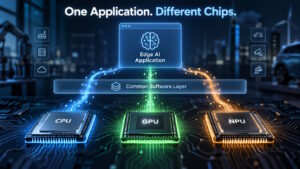
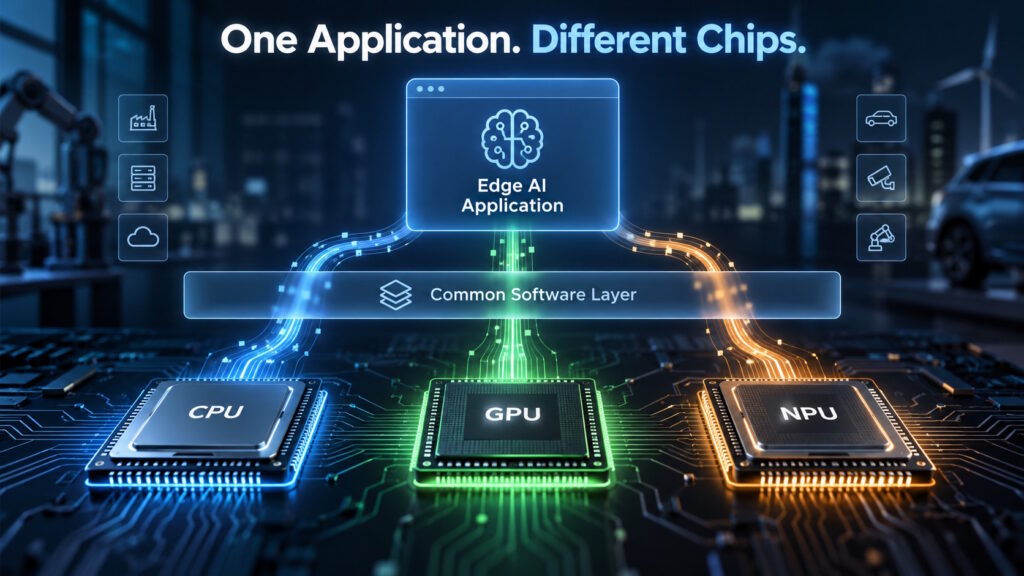
A shared runtime offers one way to reduce the hardware differences your edge AI application must handle. It separates the application’s requests from some hardware-specific execution details.
A shared way to request a prediction
A runtime is the software that executes a model when your application requests a result. A common runtime offers a consistent interface, while hardware-specific components handle supported processors underneath. ONNX Runtime illustrates this through components called execution providers, which connect it to different acceleration libraries.
Those components do not remove hardware dependencies. Developers still need the correct supporting libraries, even when the application’s interface stays consistent. The common interface simplifies part of the connection rather than making the underlying hardware differences disappear.
Edge AI beyond the development device
Google’s April 23, 2026, LiteRT update describes a shared interface across supported CPUs, GPUs, and NPUs. These include general-purpose processors, graphics processors, and specialized neural processing units. Google presents this approach as a way to reduce separate integrations with accelerator vendors.
Its August 11, 2026, Raspberry Pi guide makes those execution options tangible. A robot demonstration assigns object detection to the Raspberry Pi 5’s GPU. Meanwhile, the CPU handles speech recognition, language-model processing, and speech generation. The example demonstrates supported workloads sharing a software framework, not universal compatibility between chips.
Why “Compatible” Does Not Mean “Equally Fast”
For a deployment decision, “Does it run?” is only the opening question. Two more follow: “Where does it run?” and “Does it do the job well enough?”
Can the model actually run?
AI models contain computational steps called operators. The chosen software and hardware combination must support the steps the model needs. Recognizing the model’s file format does not establish that an accelerator supports every operation. Google’s GPU documentation explicitly lists supported operations and their limitations.
Is the accelerator doing the work?
In some LiteRT GPU configurations, the CPU takes over operations that the GPU cannot handle. This fallback can allow processing to continue, but it can also add delays. Google warns that coordinating work between both processors can make execution slower than using the CPU alone.
Does the application still do its job?
Back at our imaginary factory, the replacement computer might identify defects correctly but respond too late. Products have already passed the inspection point, so the application misses its purpose.
ONNX Runtime recommends testing against the target platform’s requirements, including response time and power consumption. Its guidance also notes that the model must fit within the device’s storage and memory.
Compatibility opens the door; application testing decides whether the device belongs on the production line.
When Hardware Flexibility Becomes Business Flexibility
Suppose the manufacturer finds a cheaper computer for its edge AI application. That saving looks different when the switch requires substantial adaptation and testing. The useful comparison includes both the purchase price and the effort needed to preserve the application.
Now imagine the company upgrades only half its sites. The others still need working inspection systems, although their computers belong to an older generation. The goal is consistent business functionality, not identical machines or identical performance.
Even a shared framework can require different model packages. ONNX Runtime cautions that models optimized for one hardware configuration may not work on another. For example, its guidance rules out moving a model pre-optimized for GPU execution directly onto a CPU-only machine.
Some projects have little reason to support a wide range of processors. An edge AI product with fixed equipment and demanding response times may reasonably favor a specialized design. The decision is whether those advantages justify the migration work your team might face later.
Questions Worth Asking Before Your Next Purchase
Before choosing equipment, a conversation with your developers or vendor can clarify what hardware flexibility would actually involve.
“Which combinations do you support?” is more useful than asking whether a device is AI-ready. The answer should cover your model, processor, operating system, and runtime. Google’s NPU documentation shows that vendor support and supporting libraries remain part of deployment planning.
The next question is practical: “What changes when we move to another device?” Your team should distinguish reusable application code from model preparation, supporting software, and testing. For a mixed fleet, that discussion should also cover updates and responsibility for each device generation.
Finally, “Have you tested our workload on this hardware?” brings the conversation back to evidence. ONNX Runtime notes that acceleration performance depends on the particular device and model. Results from another setup cannot settle whether yours meets its requirements.
Conclusion: Think Beyond the First Device
Our manufacturer does not need every computer to behave identically. It needs a clear path for retaining the inspection capability when equipment changes. That includes understanding what the team can reuse, what it must adapt, and how it will confirm useful performance.
A good hardware decision should account for what comes after the first successful demonstration. The goal is to preserve options rather than make every chip interchangeable. If you want to keep exploring how edge AI and other emerging technologies are changing real-world technology decisions, join the conversation at Tech Scope Connect for insights, expert discussions, and live events.
Sources:
- Building Real-World On-Device AI With LiteRT and NPU | developers.googleblog.com
- Execution Providers | onnxruntime.ai
- NPU Acceleration With LiteRT | developers.google.com
- Mastering Edge AI on Raspberry Pi With LiteRT and Gemma | developers.googleblog.com
- GPU Delegates for LiteRT | developers.google.com
- Deploy on Mobile | onnxruntime.ai
- Graph Optimizations | onnxruntime.ai