Key Takeaway: Phishing scams no longer arrive only through suspicious emails. Attackers now use calls, texts, QR codes, messaging apps, and deepfake media—sometimes moving across several channels to build trust. The safest response is to verify sensitive requests through a separate, trusted contact method before sharing information or taking action.
The Bait Is Everywhere
Phishing scams no longer wait quietly in your email inbox. These phishing attacks can arrive through calls, texts, QR codes, messaging apps, or synthetic media. Some begin as simple online fraud and grow into a convincing conversation across several channels.
A suspicious email may still start an attack. However, the next step could appear on your phone, inside a work platform, or on a printed sign.
Recent research shows why this wider view deserves attention. Mandiant found that voice phishing accounted for 11 percent of observed initial infection vectors during its 2025 investigations. Email phishing accounted for 6 percent. Verizon found a 40 percent higher median success rate for mobile-focused methods in phishing simulations. Those methods included voice and text messaging. ENISA used a broader category and identified phishing in 60 percent of observed initial access cases.
These reports measure different groups and outcomes. Together, they suggest that attackers have found more places to present the bait.
Why Phishing Scams Are Moving Beyond Email
Email security has improved. Filters can flag suspicious links, block harmful attachments, and warn users about unfamiliar senders. Many employees also know the classic signs of a questionable email.
Attackers have not abandoned email. They have expanded into spaces where people may feel less guarded. Personal phones, direct messages, collaboration tools, and QR codes often receive fewer visible warnings.
Live communication creates another advantage. A caller can hear hesitation, answer questions, and reshape the story immediately. A text conversation can also build trust gradually.
The result feels less like opening a suspicious message. It feels more like solving an account problem or helping a colleague.
A Text Message Can Open the Door
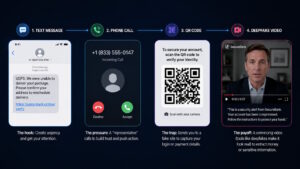
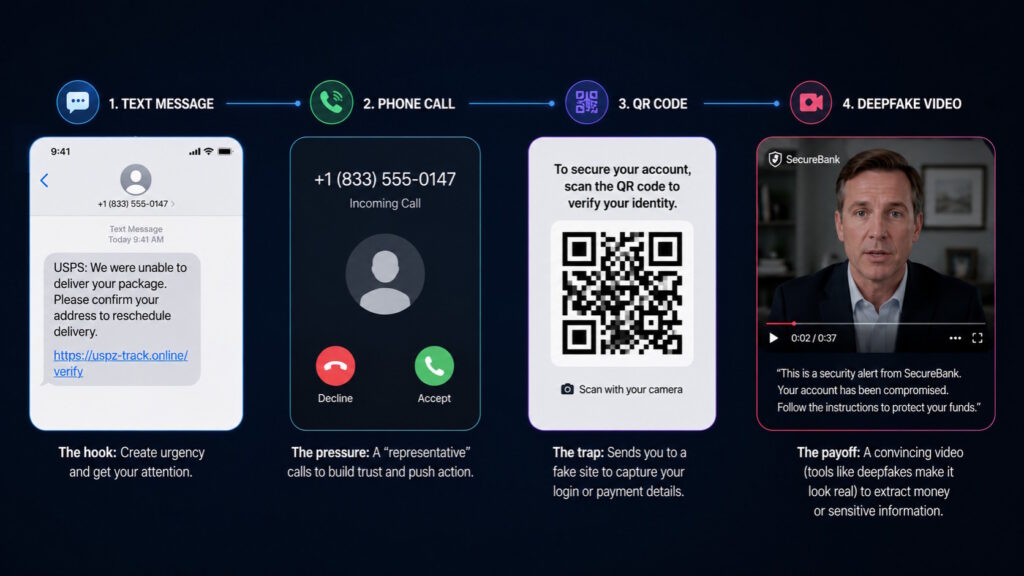
Text phishing often uses a familiar concern. You might see a delivery notice, bank alert, unpaid toll, job offer, or account warning. The message usually points toward a link, telephone number, or QR code.
The small screen helps the deception. Mobile users may see only part of a web address. They may also act quickly while commuting or switching between tasks.
A text can serve as the first chapter of a longer story. The sender might claim that a support agent will call next. When the call arrives, it seems to confirm the warning.
Can a simple text really start a serious attack? Yes, especially when another channel makes the message appear legitimate. Many phishing scams rely on that handoff. CISA identifies text-based smishing as a form of social engineering.
The Call May Be Step Two
Voice phishing can continue a story that began somewhere else. The caller may mention a recent text, security alert, direct message, or supposed technical problem. This sequence gives the conversation a sense of history. A request for an authentication code or account reset can then sound routine.
Interactive calls also challenge automated defenses. Mandiant notes that voice attacks resist many controls designed for static messages. The important point is not whether the caller sounds nervous or polished. The surrounding story may provide most of the persuasion.
QR Codes Hide the Destination
QR codes make digital actions feel quick and familiar. People scan them for menus, payments, tickets, parking, and product information. That convenience can hide where the code leads.
A fraudulent code may appear in a text, package, poster, invoice, or public location. It can open a website resembling a bank, delivery service, employer, or government agency.
The Federal Trade Commission warns that malicious QR codes can lead to spoofed websites that steal login or payment information. Some can also trigger harmful downloads.
Can you judge a QR code by looking at it? Usually not. The surrounding message supplies the trust, while the code conceals the destination.
Familiar Platforms Can Lower Your Guard
A message can feel safer when it appears inside a familiar app. Attackers exploit that comfort through fake profiles, compromised accounts, and convincing display names. The sender may appear to be a colleague, recruiter, friend, executive, or support team. An ordinary conversation can later turn toward a document, code, payment, or platform change.
The FBI has documented impersonation campaigns that began through texts or AI-generated voice messages. Attackers then moved targets to Signal, Telegram, or WhatsApp. A familiar platform confirms only where the message appeared. It does not confirm who controls the account.
Deepfakes Add a Convincing Face or Voice
Deepfake audio and video can make an impersonation feel personal. A voice memo may sound like a manager. A video might appear to feature a public figure or family member.
These tools strengthen older tactics rather than replace them. The attacker still needs a believable story and a requested action.
The FBI reports that scammers use voice clones, fake profiles, false documents, and believable videos in fraud schemes. Yet many suspicious calls require no synthetic media. Ordinary social engineering still works.
Strange pauses or visual flaws may raise concern, but polished media can still deceive. Verification remains more dependable than confidence in your eyes or ears.
How Phishing Scams Move Across Channels
Imagine receiving a text about unusual activity on your work account. Ten minutes later, someone calls and claims to represent your IT team. The caller refers to the alert and offers immediate help. A QR code then arrives through a messaging app. It opens a branded login page and requests your password.
Next, you receive a voice message from an apparent manager. The message urges you to resolve the issue before an important meeting. No single step needs to look extraordinary. The sequence creates credibility through repetition and consistency. Attackers can then request credentials, authentication codes, remote access, documents, or money.
This approach changes the question you should ask. Instead of asking whether each message looks real, ask whether you independently confirmed the requested action.
What Does the Attacker Really Want?
Phishing scams do not always aim for a stolen password. An attacker may want you to approve a login or reset an account. The request could also involve remote-support software.
Other requests may involve changing payroll details, transferring money, sending confidential files, or moving to a private app. Even an introduction can provide access to another target.
The message delivers the story, but the requested action creates the risk. Urgency often hides that distinction. A deadline, threat, reward, or emergency pushes attention toward the story instead of the action.
Verification Works Better Than Guesswork
A convincing phone number, logo, profile, voice, or video can still mislead you. Verification works best outside the incoming conversation.
You can open the organization’s official app or visit its known website directly. At work, a trusted directory or established support process provides a safer route. A previously saved number can help confirm a personal request.
The key is to verify the action, not only the apparent sender. An attacker may control a real colleague’s account. A familiar voice may come from synthetic audio.
Sensitive requests deserve extra care. Money transfers, login approvals, authentication changes, and remote access should follow known procedures. A second person can also confirm high-impact decisions.
When several contacts seem connected, report the full sequence. The text, call, QR code, and login prompt may reveal more together.
Security Awareness Must Follow the Conversation
Many awareness programs still center on suspicious emails. That foundation remains useful, but it no longer covers the whole journey. Training should include texts, QR codes, calls, direct messages, collaboration platforms, and synthetic media. Employees also need clear expectations for legitimate IT support and account recovery.
Organizations can reduce confusion by making trusted procedures easy to recognize. Employees should know how support teams make contact and what they never request. Consumers benefit from the same approach. Unexpected contact should not rewrite the established ways they reach banks, services, agencies, or relatives.
Security awareness works best when it reflects real communication habits. People move between channels all day, and attackers follow them.
Conclusion: Trust the Process, Not the Presentation
Phishing has not disappeared from email. It has spread into the calls, messages, codes, platforms, and media that shape everyday communication.
That wider reach does not require constant suspicion. It requires a reliable way to separate a convincing presentation from a legitimate request. A pause, an independent contact method, and a known approval process can break the attack’s momentum. Those habits work across channels, even as the technology changes.
Want to stay informed about how cybersecurity threats are evolving? Join the conversation at Tech Scope Connect, where we explore emerging technology through expert insights, live newscasts, and global summits.
Sources:
- Spoofing and Phishing | fbi.gov
- Cryptocurrency and AI Scams Bilk Americans of Billions | fbi.gov
- Senior U.S. Officials Continue To Be Impersonated in Malicious Messaging Campaign | fbi.gov
- Scammers Hide Harmful Links in Qr Codes to Steal Your Information | consumer.ftc.gov
- Avoiding Social Engineering and Phishing Attacks | cisa.gov
- ENISA Threat Landscape 2025 | enisa.europa.eu
- Verizon DBIR 2026: Help Protect Your Business with Cybersecurity Fundamentals | verizon.com
- M-Trends 2026 Report: Executive Edition | cloud.google.com