
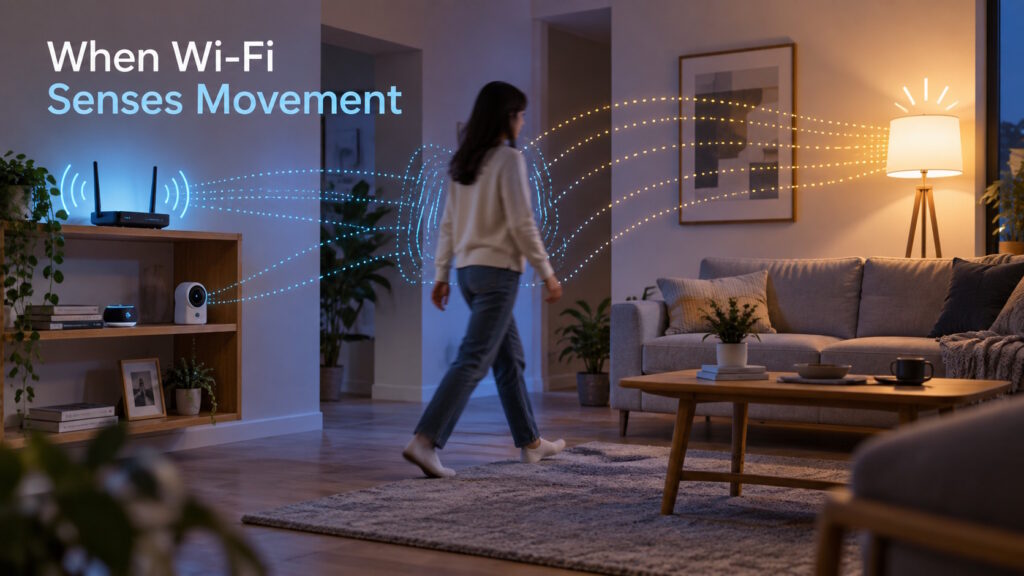
Key Takeaway: Wi-Fi sensing uses changes in wireless signals to detect movement through compatible equipment and software. It can support automatic lighting and activity notifications without cameras or wearable devices. However, detecting motion does not automatically reveal who is present or what they are doing. Performance depends on the equipment and surroundings, while camera-free operation still raises privacy questions about the activity data collected.
A Familiar Room, an Unexpected Response
Wi-Fi sensing can help compatible devices detect movement, giving a familiar network a role beyond carrying data. This form of wireless sensing already supports lighting that responds to movement without a separate motion sensor.
The everyday appeal is easy to picture: you enter your living room, and the lights switch on automatically. Behind that small convenience sits a bigger question: what else could a network notice about its surroundings?
How Does Wi-Fi Sensing Detect Movement?
Wireless signals travel through a room along several paths, reflecting off walls, furniture, and other surfaces. As you move, your body changes some of those paths and the signals that reach nearby devices. Sensing software examines those changes for signs of movement.
Your network still carries data, but compatible equipment also measures how the signals change along the way. It is rather like noticing ripples without needing a photograph of whatever disturbed the water.
This does not require tracking a phone as it joins the network. In device-free sensing, the system detects your effect on radio signals rather than relying on a device you carry.
Movement Is a Clue, Not the Whole Story
“Does it know someone is in the room?” sounds straightforward, but it hides several different tasks. Motion detection asks whether something moved, while presence or occupancy detection asks whether someone is there. Activity recognition goes further, attempting to identify what that person is doing.
Suppose you walk into the room and settle down to read. Detecting your entrance does not prove that a system can keep confirming your presence while you sit still.
Nor does every movement come from a person. Xfinity acknowledges that its WiFi Motion feature cannot always distinguish pets from people, especially small children. A motion alert alone should therefore not become proof of identity or a security threat.
The useful question is not just whether a product detects movement, but what its detections actually support.
Wi-Fi Sensing Steps into Everyday Life
WiZ SpaceSense offers a practical example: compatible lights detect movement and automate the room’s lighting. Its setup guidance calls for two lights in the same room, separated by at least two meters. The lights themselves participate in sensing, rather than waiting for instructions from a separate motion detector.
Xfinity takes a different approach with WiFi Motion, an opt-in feature for eligible customers with compatible equipment. Its gateway and selected connected devices create sensing areas that can trigger activity notifications. Xfinity explicitly says this feature is neither a home security service nor professionally monitored.
Meanwhile, ADT announced its acquisition of Origin AI on February 24, 2026. The company said it expected to start bringing new integrated offerings to customers in 2027. The announcement described a development timeline rather than an immediate product launch.
Beyond homes, a possible application would involve meeting rooms that adjust lighting or comfort settings around actual occupancy. However, a residential example does not establish commercial-building readiness. WiZ specifically says it has not validated SpaceSense’s performance in nonresidential environments.
Why One Room Can Work Better Than Another
“Can my current router do this?” is a reasonable next question. A Wi-Fi connection alone does not provide sensing capability; the chosen service must support your equipment and setup.
Placement also shapes the result. Xfinity describes sensing areas between its equipment and selected connected devices, rather than promising detection everywhere internet access works. A room can have usable Wi-Fi without complete motion-detection coverage. Participating devices that disconnect or go to sleep can also interrupt detection.
Everyday movement adds another complication. Research from Origin and the University of Hong Kong identifies pets, hardware differences, and multiple occupants as practical deployment challenges. When several people move together, separating their movements becomes harder than simply noticing activity.
Sensitivity adjustments involve compromises, too. Xfinity explains that higher sensitivity can produce unwanted notifications, while lower settings may miss meaningful motion. Its guidance also considers shared walls and neighboring homes when discussing these settings.
More advanced interpretation remains an active research problem. An August 9, 2026, preprint examines how activity- and gesture-recognition systems handle different users and conditions. It addresses research challenges, not independent testing of the consumer products discussed here.
Camera-Free Does Not Mean Privacy-Free
Xfinity says WiFi Motion does not capture images, video, or audio, although it can generate activity notifications. Avoiding those recordings removes an important category of information, but it does not eliminate data collection.
A motion history could still suggest when a room sees activity or when a household follows a routine. Those would be inferences rather than photographs, yet they could reveal information occupants consider private. The amount someone could infer would depend on the detail and history the service makes available.
A useful privacy conversation starts with who can activate sensing and who can see the results. It should also cover local or cloud processing, retention periods, and whether occupants know the feature is active. In a shared home or workplace, those answers deserve as much attention as the absence of a camera.
Conclusion: A Network That Does More Than Connect
Back in that living room, the most useful system may simply turn on the lights when you arrive. It does not need to explain your entire evening to earn its place.
The broader opportunity lies in matching a dependable signal to a practical task, rather than assuming every detection tells a story. As you explore connected spaces, that distinction helps separate useful features from ambitious promises.
Curious about how emerging technologies are changing the spaces around us? Join the conversation at Tech Scope Connect, where we explore emerging technologies through expert insights, live newscasts, and global summits.
Sources:
- What Do I Need to Know About SpaceSense? | wizconnected.helpshift.com
- WiFi Motion in the Xfinity App — FAQs | xfinity.com
- Experience Paper: Scaling WiFi Sensing to Millions of Commodity Devices for Ubiquitous Home Monitoring | arxiv.org
- Using WiFi Motion in the Xfinity App | xfinity.com
- DoRF++: Spherical Representation Learning over Doppler Radiance Fields for Robust Wi-Fi Sensing | arxiv.org
- What is SpaceSense? | wizconnected.helpshift.com
- SpaceSense – Lights as motion sensors | wizconnected.com
- ADT acquires Origin AI to power AI sensing and ambient intelligence for the home | news.adt.com